
Greetings from DCAMM Contractor Certification!
As more and more contractors begin to file applications through the new DCAMM Contractor Management System (DCMS), DCAMM will endeavor to issue periodic tip sheets to assist contractors through the application process and answer commonly asked questions.
COMMONLY ASKED QUESTIONS
Can affiliated companies have the same email as part of their login to DCMS?
No. Affiliated companies must use separate emails for their login to DCMS. Using the same email will cause the data to become corrupted and the files will merge.
Can each company have multiple users with different email addresses?
Yes. Each company can have multiple users. There are two options to add a user.
Option 1
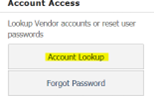
There is a tutorial which explains how to add a user before you log in to your DCMS account. You can find the tutorial by first clicking on the Account Lookup button under Account Access on the DCMS Homepage:
Click on Account Lookup
Next, click on the New User Request tutorial:

You may also learn how to Change User Information or Request a Username and Password.
Option 2
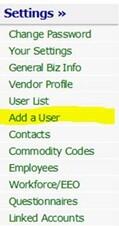
If you have logged into your account you will find Add A User under the
Settings section on the left navigation.
You can also remove users no longer with you company by selecting User List