
You do not need a MyMassGov account to check a license
- To look up a license or permit, on DOL’s Home page, click next to the To search for a license prompt:

eLIPSE will display this Find a License Search page:
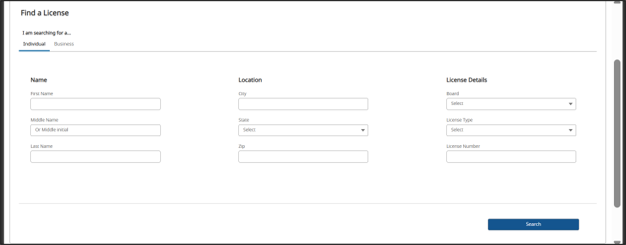
- At the top of the form, click a tab to search for a person’s license or a business’ license.
- Enter information that eLIPSE should search for.
- At the bottom right of the form, click the Search button.
- eLIPSE will display a list of licenses that match what you entered. To view a license in detail, at the right side of its row, click the View License button.
Tips for searching
- You don’t need to fill in every part of the form. For example, you do not need to know a license number to locate a license. Enter as much as you know.
- Spell what you enter correctly. If you misspell a person’s name or their city, eLIPSE will not be able to find them.
- If you filled in a lot of the form and eLIPSE cannot locate the license, try using less information.
Questions?
If you have more questions about checking a license or permit, please contact the appropriate board.
Contact
Online
Phone
MassRelay (TTY & ASCII)
Call Division of Occupational Licensure, MassRelay (TTY & ASCII) at 711