
Is it time to renew my business license?
You can renew your business license starting 90 days before it expires.
We strongly recommend renewing your license well before its expiration date. You might need some additional time to get used to the new licensing platform. Renewing early gives you time to follow the instructions and resolve any technical issues before your license expires.
To find out if it is time to renew your business license, log in to your eLIPSE account.
On your eLIPSE Home page, eLIPSE lists your personal and business license(s). If any are eligible for renewal, you will see this next to the license:

To start the renewal process, click Renew License. eLIPSE will guide you through the renewal process.
I don’t see my business on my eLIPSE Home page. What should I do?
Please let DOL assist you with this.
- At the top of any eLIPSE page, click REQUEST SUPPORT:

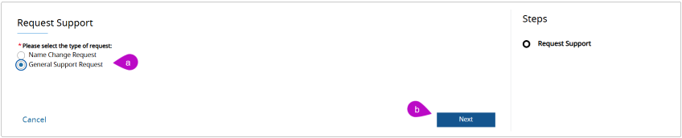
- eLIPSE displays the Request Support box:
- Click the General Support Request radio button.
- Click Next.
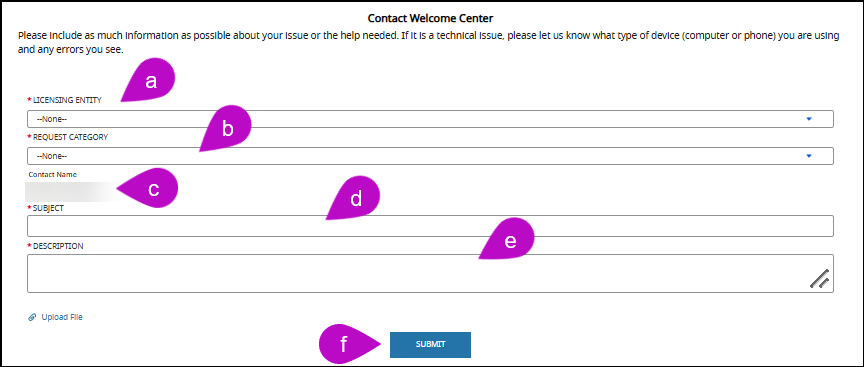
- eLIPSE displays the Contact Welcome Center form:
- For LICENSING ENTITY, select your board or other unit that issued your license.
- For REQUEST CATEGORY, select Other.
- eLIPSE will display the Contact Name (that’s you.)
- For SUBJECT, you can enter My business does not appear on my home page.
- In DESCRIPTION, please provide your business license number.
- Click SUBMIT.
Please do not create another eLIPSE account for your business! That will only make things more complicated. There are a couple of reasons why your business license does not appear. Those reasons are internal to eLIPSE, and making another account will not help. DOL will be glad to help you when you contact us.
Is my business license a separate eLIPSE account?
Yes, but… You do not create it, eLIPSE does. Here’s what happens: When you first create your eLIPSE account, eLIPSE links your business license(s) to your own eLIPSE account. When you log in to eLIPSE, you should see your business license(s) on your eLIPSE Home page. If you do not see your business license(s) there, please follow the steps in the section above.
Please do not create a separate eLIPSE account for your business.
If you already have an eLIPSE account, do not create another one.
You only need one account to manage your personal license(s), business license(s), permits, and any other business you have with DOL.
If you have forgotten your eLIPSE login password, when you are on the MyMassGov login page, click the Forgot Password link.
Please do not try to create another eLIPSE account.
Questions?
If you have more questions about renewing a license or permit, please contact the appropriate board.
Next steps
The Board Staff will review the submitted application and reach out if further information is needed.