
2026 Trapping season dates
| Species | Open season |
|---|---|
| Beaver1 | Jan. 1 – April 15, 2026 and Nov. 1, 2026 – April 15, 2027 |
| Bobcat1,2, coyote1, fox1, weasel | Nov. 1 – Nov. 30, 2026 |
| Fisher1 | Nov. 1 – Nov. 22, 2026 |
| Mink1, river otter1 | Nov. 1 – Dec. 15, 2026 |
| Muskrat, opossum, raccoon, skunk | Jan. 1 – Feb. 28, 2026 and Nov. 1, 2026 – Feb. 28, 2027 |
1: pelt sealing and reporting required
2: bobcats may only be trapped or salvaged in zones 1-8
Harvest reporting (pelt checking)
Harvest reporting rules for bobcat and otter
Bobcat and otter must be checked within 4 working days of the end of the season at a physical check station. Bobcats and otters cannot be reported online. The seal you receive from the check station must remain attached to the pelt until the pelt/carcass is prepared for mounting or the pelt is sold or tanned. Click here to find a check station.
Harvest reporting rules for beaver, coyote, fisher, fox, or mink
You must report harvested beaver, fisher, mink within 4 working days of the end of their respective seasons.
Coyote and fox must be reported within 48 hours of harvest.
You can report your harvest in person at an official check station. (The seal you receive from the check station must remain attached to the pelt until the pelt/carcass is prepared for mounting or the pelt is sold or tanned.)
You can report online using MassFishHunt, see instructions below:
- Go to MassFishHunt.mass.gov and select "Log In."
- Once logged in, you will be taken to your customer dashboard. Scroll to the bottom of the page to a partial list of your harvest reports.
- Click “View All Harvest Reports”.
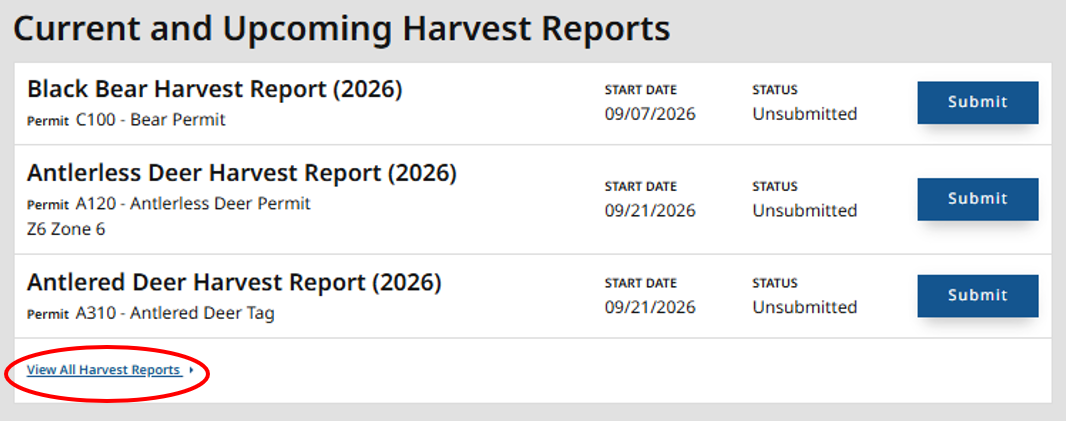
- On the next screen, click "Furbearers" at the top of the page.
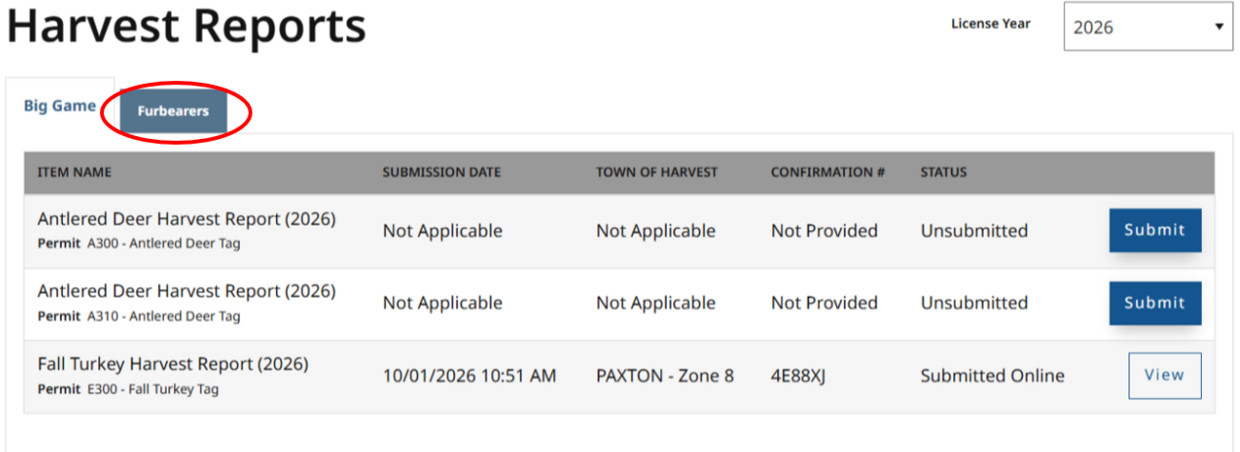
- Click "Submit" next to the species you want to report.


- You will be prompted to answer a series of questions. To answer some of the questions, you will need to examine the animal. When finished, click “Submit.”
- You can review the information you entered. After reviewing, click “Submit” (or click “Back” to edit your answers).
- A message with your confirmation number will appear after you submit your report.
IMPORTANT: You must write this number on a harvest tag of your own making and attach it to the harvested animal. Confirmation numbers must remain attached until the pelt/carcass is prepared for mounting or the pelt is sold or tanned.