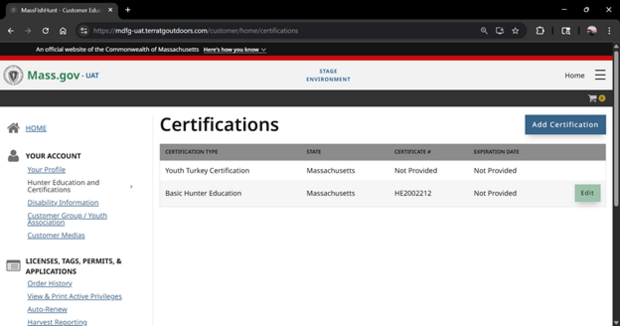
After completing either the online or in-person youth turkey seminar, along with Basic Hunter Education, a youth turkey authorization will be added to your customer profile in MassFishHunt within 5 business days of completing the seminar. You must have completed basic hunter education to get your turkey permit/hunt eligibility. The youth’s Customer ID must be entered when registering for the Youth Turkey Seminar or the youth turkey certification will not be applied. If you did not add your Customer ID please email them to jack.bonafini@mass.gov
Instructions
Logging into MassFishHunt
All customers age 13 and older must have their own MassFishHunt account with a unique email address. Go to MassFishHunt and click on Sign Up to get started. Get step-by-step instructions on how to create an account in MassFishHunt.
Accounts for youth under age 13: Kids under 13 can not have their own online MassFishHunt account. Parents/guardians can link to a minor under 13 by entering basic information to either find an existing minor account or create a new linked account. Once linked, you can make purchases and manage account information for the minor. Get step-by-step instructions on how link an account in MassFishHunt.
Obtaining Your Permit/Eligibility
Youth hunters ages 12-14 need a Youth Turkey Permit:
- Once you are logged into MassFishHunt, go to Buy Licenses in the main menu.
- Go to the Hunting Permits & Stamps section and add a Turkey Permit (age 12-14) to your cart. If you are not able to add the permit, you may need to enter your hunter education information in the Hunter Education and Certificates section on your account homepage
- Once you have added the Turkey Permit (age 12-14) to the cart, checkout and print.
*If you do not see both your spring and fall turkey tags on the turkey permit (age 12-14) after checkout, go to the customer home page, select active privileges and re-print your permit.
Youth hunters ages 15-17 need a Minor Hunting License, a Turkey Permit, and a Youth Turkey Hunt Eligibility:
- Once you are logged into MassFishHunt, go to Buy Licenses in the main menu.
- Go to Licenses section and add a Hunting License (age 15-17) to your cart. Parent or guardian authorization is required for this step.
- Go to Hunting Permits & Stamps section and add a Turkey Permit to your cart.
- Next, add a Youth Turkey Day Eligible (age15-17) to your cart. If you are not able to add the Youth Day Eligible (age 15-17) product to your cart, you may need to enter your hunter education information in the Hunter Education and Certificates section on your account homepage.
- Checkout and print.
*If you do not see the Youth Turkey Day Eligible (ages 15-17) on your license after checkout, go to the customer home page, select active privileges and re-print your license.