
Hopefully by now you have had the opportunity to take a peek at the new projects table in the online application. The projects table has a unique feature not previously available. You now list both Prime and Filed Sub-Bid projects on the same combined table.
Combined Projects Tables
For Prime Projects just select the “Prime: category of work” from the drop down menu. For Filed Sub-Bid projects select the “Sub: category of work” from the same drop down menu. Filed Sub-Bid Categories are listed below the Prime Categories. (See Snapshots below)
Crossover Projects Tables
For contractors with crossover categories (see DCMS Tip Sheet Volume 1 Edition 11 published October 25, 2019) you should list projects that can be applied to both Prime and Filed Sub-Bidder Certifications in one table and submit just the Prime Application.
Multiple Application Projects Tables
For contractors that apply separately for both Prime and Filed Sub-Bidder Certification you too list your projects on the same table.
Things to keep in mind:
- Any edits done in the table will appear in all applications.
- Once an application is submitted, you will not be able to edit the projects table in that application.
- Applications should not be submitted until the projects table is complete with all Prime and Filed Sub-Bid projects so any edits will appear in all apps.

Remember – if you select GBC (General Building Construction) as a Category of Work, you must complete the Sub-trade Work section on the far-right side of the table. GBC projects require three sub-trades that can be either supervised or self-performed. Pick your highest valued sub-trades as that is how we will determine if the projects will qualify towards your GBC certification. Each Sub-trade should be at least 5% of the total contract amount. The Sub-trade categories do not need to be DCAMM Categories of Work, but they must be building related.
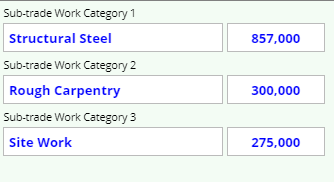
In this example, the Total Contact Amount is $5,5000,000.
The Sub-trades listed are equal to or beyond the 5% needed to qualify for GBC
If you have any questions do not hesitate to contact Certification at 857-204-1305 or certification.DCAMM@mass.gov.