
Wright Express (WEX) EV Charging Cards may be requested from the Office of Vehicle Management (OVM) by Executive Branch Agencies or Agencies for which OVM manages their WEX program. Send requests to ovm-fuelcards@mass.gov.
WEX EV Charging En Route Solutions for ZEVs
WEX is developing solutions to facilitate the integration of electric vehicles into mixed-fuel fleets, helping customers reduce their carbon footprints while still meeting the complex reporting and cost measurement needs of the business. By utilizing a WEX RFID card, agencies and their drivers may conveniently initiate EV charging sessions at a broad and growing network of public charging stations across the United States. All charges are consolidated onto a single invoice and integrated report, simplifying the billing process for each WEX fuel card account.
OVM successfully implemented this program for all Zero Emissions Vehicles (ZEVs) currently operating within the OVM-Managed Fleet. Our focus now shifts to preparing all agencies to seamlessly adopt this program as they integrate ZEVs into their fleets. To achieve this, all agency WEX accounts must complete an EV Charging enrollment form. This proactive step will enable the immediate issuance of EV charging cards upon the acquisition of ZEVs by each agency.
The enrollment form outlines the following fees:
- Monthly EV Fee: A $5.00 fee is charged per enabled card, regardless of usage.
- RFID Replacement Fee: A $10.00 fee is charged for each replacement RFID device.
Concerns have been raised regarding the “Monthly EV Fee” when some agencies have access to free charging on state property. While charging at state facilities is the preferred fueling method for EVs, the WEX RFID card provides additional access to more than 6,000 public charging ports statewide, offering flexibility in the event free charging is unavailable or inconvenient. We encourage each Agency to continue to take advantage of all private charging that is available to them, but we also stress the importance of having access to public charging to support ad-hoc needs or changing missions.
As the Commonwealth adds more ZEVs to its fleet to comply with Executive Order 594 (EO594), we must ensure that every OVM-Managed ZEV has access to all WEX charging stations should a situation arise where private charging is an unavailable option.
Every OVM-Managed WEX account shall enroll in the WEX EV Charging program. Each ZEV will be issued an RFID card, which ensures the Agency has an alternative to support their private charging stations if access is not readily available.
As this offering from WEX is relatively new, OVM is actively refining the process to ensure a smooth rollout as our ZEV fleet expands. We appreciate your patience and understanding.
This document will be updated as details evolve.
For inquiries, please contact OVM at ovm-fuelcards@mass.gov.
General EV Charging Card Information
WEX RFID Card
RFID cards are needed to charge ZEVs (zero emission vehicles) at public charging stations. This includes:
- BEVs (full battery electric vehicles)
- PHEVs (plug-in hybrid vehicles) –> they also use fuel
To link the EV charging RFID card to your current WEX Account, a corresponding WEX Fuel Card also must be issued for each Plate (this is necessary due to WEX’s current structure).
- BEVs should not have any need to use this fuel card
- PHEVs may use this card for fuel transactions if EV charging is not available
- RFID cards are assigned to a specific vehicle, not a driver (similar to the fuel cards).
- Do not use RFID card on different vehicles. Use only for the vehicle assigned to the card.
Unlike the WEX fuel card, the RFID card has no identifying information on it other than a number on the back side that looks like: WEX00003118 (aka RFID card number). There is no embossing with the Agency/Unit Code and Plate Number.
- At this time, you cannot ‘search’ by the RFID card number in WEX online. However, WEX is working on a solution for that search functionality.
- To protect against theft and unauthorized use, cards must be kept in a secure location
- When ZEVs are taken out of service by the Agency (not brought to OVM Field Office in Westborough), the Agency Fleet Manager should immediately contact ovm-fuelcards@mass.gov to terminate the fuel & RFID cards.
How to Obtain a WEX RFID Card
Vehicles at the OVM Field Office in Westborough:
- New Fuel and RFID cards are automatically ordered for all new ZEVs delivered through the OVM Field Office in Westborough, as well as redeployed ZEVs from this location. This is provided to the driver when the Agency picks up the vehicle.
- OVM will place both the fuel and RFID cards in a protective plastic sleeve with a zip-type closure for security and attach a lanyard.
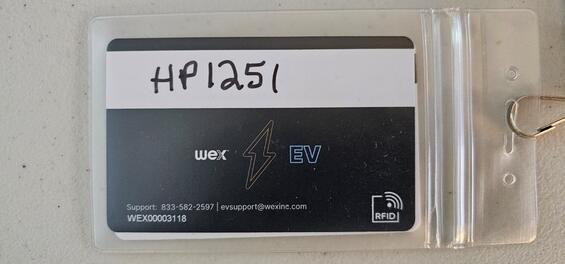
RFID Charging Card on one side with vehicle plate number written on the back side on the white strip.
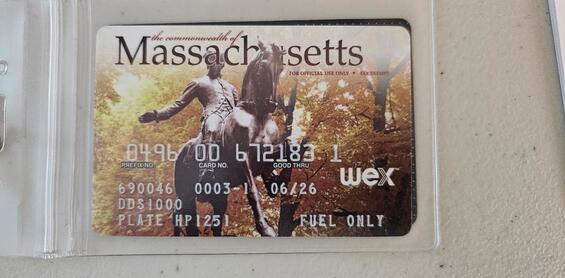
Fuel Card on the other side with plate number showing.
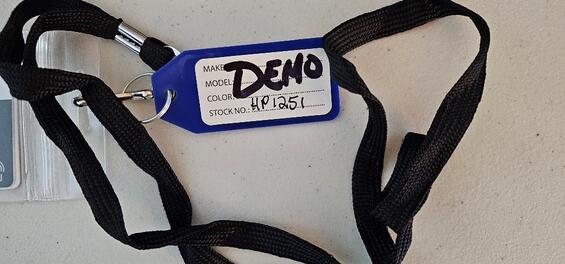
A colored key tag is attached with the Plate number written on it.
- Blue – BEVs
- Red – PHEVs
Vehicles Not at the OVM Field Office in Westborough
- If your new or redeployed ZEV is not at the OVM Field Office in Westborough, the cards will NOT be with the vehicle when the Agency takes delivery of the vehicle.
- Contact OVM at ovm-fuelcards@mass.gov to request the RFID cards.
- Be Aware - Cards shipped directly to the Agency:
- Cards will NOT have the plastic sleeve, lanyard, and colored key tag as shown above.
- The Agency is responsible for providing these for any cards shipped directly to them
- RFID and traditional Fuel cards for the same vehicle are shipped separately. They are NOT in the same shipment package. Look for both packages.
- The RFID card package contains a sheet with the Agency WEX Account, Plate #, and RFID Card # to help match up the fuel and RFID cards
- OVM recommends the Agency, using a permanent marker, hand-write the plate number on the white strip on the back side of each RFID card to identify which vehicle the card is for.
- OVM also recommends using a colored key tag to better identify the vehicle fueling capability to the driver.
- These are suggested instructions to ensure the cards do not get separated or lost. Agencies are welcome to use their own processes to maintain these cards.
- Cards will NOT have the plastic sleeve, lanyard, and colored key tag as shown above.
Reporting Lost, Damaged or Stolen Cards and Suspected Misuse or Fraudulent Use
Lost, Damaged or Stolen Cards
- Report immediately to ovm-fuelcards@mass.gov.
- Advise vehicle plate number and which cards need to be replaced (fuel, RFID, or both)
- Replacements will be shipped to the address provided by the Agency.
- See instructions above for Vehicles Not in Westborough.
Suspected Misuse or Fraudulent Use
- Should be immediately addressed with the driver(s); notify ovm-fuelcards@mass.gov to terminate the fuel and RFID card or Driver PIN.
Where to Charge

WEX Connect App
Find Charging Stations with WEX Connect
Using the WEX Connect app, Drivers may find available on-route locations for charging stations.
- WEX Connect will show available locations within five, 10, or 25 miles of the current or selected locations.
- Drivers also may:
- Filter by connector type (All Connectors, AC – J1772, DC Fast – CHAdeMO, DC Fast – Combo)
- See locations and connector types that are available in real time
- View locations in a list or on a map
- Get directions with one click
- See ChargePoint roaming partner locations by tapping More > Enter Fleet Code and entering the code WEXEV
Without a cell phone, drivers may see charging locations in the WEX network.
Drivers may charge at any public locations operated by ChargePoint, their roaming partners EVgo, EV Connect, and Flo, plus AmpUp, Blink, and more.
EV Charging versus Fuel Transactions
Note these important differences between EV charging and fuel transactions:
- Drivers use the RFID card to activate the charging station.
- Drivers must initiate a charge with the RFID card before connecting the charger to the vehicle.
- No Driver PIN/Prompt is required
- No odometer reading is required
- No paper receipt is provided.
- There is No security feature to these cards.
- If the card is lost, anyone who finds it may pick it up and use it.
- Report lost cards immediately to ovm-fuelcards@mass.gov.
- You will be charged $10 for each replacement card.
- The station owner sets the fees. What is on the screen at the end of charging is what you are charged.
- Be aware of the costs involved
- Using Level 3 (fast) charging is quite a bit more expensive and more comparable to a tank of gas.
- The reason is the amount of power consumed in such a short amount of time. Level 3 charging will charge a vehicle in under 40 minutes up to about 80%; however, it is then considerably slower to get from 80-100% with the higher cost to charge
- Level 2 charging, if a battery is low, will take upwards of 6-8 hours.
- In a pinch, a Fast Charger may be needed to get back to the nightly garaging location.
- Whenever possible, use Level 2 charging overnight to save money.
- Using Level 3 (fast) charging is quite a bit more expensive and more comparable to a tank of gas.
Invoicing & Reporting
- Transactions in kWh and total cost will be invoiced alongside traditional fuel card reporting with ChargePoint as a new merchant.
- Online transaction reporting by Driver
- Must utilize unique Driver PINs (6-digit employee ID) to view this
Payment Controls (Authorization Profiles)
Currently, traditional WEX fuel card controls are NOT supported by RFID cards. This means that there is no limit to how many times your drivers can charge per day using the same RFID card.
Trouble Using the RFID Card?
- If the RFID card is not working or rejected, provide the following information to OVM at
ovm-fuelcards@mass.gov- Plate number and/or RFID card number
- Address of the location/site of the EV Charging issue
- Charging vendor name (example EVGo, ChargePoint, etc.)
- Date & Time of the charging was attempted
- Confirm the RFID charging card was used and NOT the fuel card (it may be confusing to some drivers)
- Do not contact the charging vendor for assistance as the service is provided through WEX and therefore, ChargePoint and other roaming partners will not have our specific card information and will not be able to assist if a problem arises.
- If an RFID card does not work at one location, go to another location and try it again. Charging infrastructure may be ‘touch & go’ at times. This industry is still developing.
Follow These Easy Steps to Get Started
- Distribute EV-enabled fleet fuel cards and RFIDs
- They are ready to use
- Charge your EVs. With WEX, EV charging is easy
- Tap your RFID when prompted at the charging station
- Plug the connector into your EVs charging port
- Charge up!
- No Driver PIN/Prompt/ID required
- No odometer reading required
- No paper receipt provided
Online Access to your Agency WEX Account(s)
If you do not have online access to your Agency WEX Account(s) and would like access, send the following information to ovm-fuelcards@mass.gov.
- First & Last Name
- Email Address
- Work Phone number
- WEX Account Name (OSD1100) or Account Number
Individual Agencies/Departments may have additional processes to follow. Check with the Agency Fleet Manager.
| Last updated: | November 1, 2024 |
|---|