

How to print a license
If you want to download a PDF file of a license to your device, or if you want to print it, here’s how.
- Log in to your eLIPSE account.
- On the Home screen, hover on My Dashboard and then click Licenses And Permits.
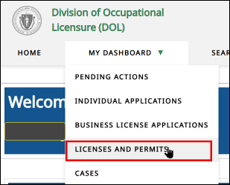
- Locate the license you want to work with, and then click the View License Details control below it.
- At the top of the box that eLIPSE displays, click the Go to your License Record and Print License button.
- eLIPSE displays the license. From this display, you can download the license file to your device and you can press Ctrl-P to bring up a Print dialog box to print it.
If you want to update the picture on your license, please refer to this How-to guide: Attach or update a photo for a license.
Questions?
If you have more questions about printing a license, please contact the appropriate board.
Contact
Online
Phone
MassRelay (TTY & ASCII)
Call Division of Occupational Licensure, MassRelay (TTY & ASCII) at 711