

How to access sessions via Zoom
To attend a District Court Department event held via Zoom, follow these steps:
- Identify the assigned session on the District Court Department’s Daily List Report published on the court’s website (refer to example):
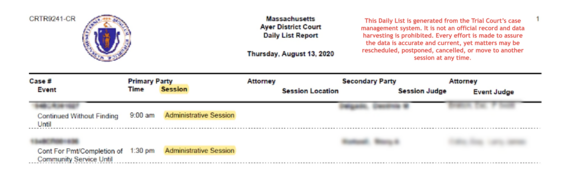
- If you have a case in the Worcester District Court conducted via Zoom and you have access to the internet, you should download the free Zoom application to access the video hearing.
- When prompted, use the Meeting ID and Passcode listed under the appropriate session. Please use the code at the scheduled date and time of your hearing.
- You will be connected once the event begins.
Per SJC Rule 1:19, you are strictly prohibited from making any unauthorized recording of the hearing.
| Room | Session name | Schedule | Meeting ID | Passcode |
|---|---|---|---|---|
| 14 | Arraignments | Monday–Friday 9 a.m. | 161-034-6344 | 201446 |
| 15 | Pre-Trial, Compliance/Election | Monday–Friday 9 a.m. | 160-5839-6054 | 364857 |
| 16 | Civil | Monday–Friday 9 a.m. | 161-1355-9848 | 582088 |
| 22 | Overflow Room | Monday–Friday 9 a.m. | 160-1968-2654 | 514351 |
| 23 | Jury Trials, Bench Trials, Motions | Monday–Friday 9 a.m. | 161-2844-0041 | 695377 |
| 24 | Returning Restraining/Harassment Orders/Overflow Room | Monday–Friday 9 a.m. | 161-5026-1013 | 493494 |
| 24 | Mental Health | Wednesday 9 a.m. | 160-2700-0305 | 559733 |
| 24 | Civil Motor Vehicle Appeal | Monday–Friday 9 a.m. | 161-1827-5715 | 960857 |
| 24 | Small Claims/Supplementary Process | Monday–Friday 8:45 a.m. | 160-0034-3738 | No passcode |
Contact
Phone
Probation Department
Call Worcester District Court, Probation Department at (508) 831-2010
MassRelay: Dial
Call Worcester District Court, MassRelay: Dial at 711
Fax
Clerk's Office
(508) 797-0716
Probation Department
(508) 752-6191
Address
225 Main St., Worcester, MA 01608
| Last updated: | April 21, 2026 |
|---|