
Trackchair models at DCR
DCR currently has two models of Trackchair: the AXIS 40 and the NT 18. The operation of both models is very similar, so you can watch the AXIS orientation video to learn how to use both types of Trackchair.
DCR's AXIS 40 Trackchair is available to use at Windsor State Forest. It is larger and heavier, with a higher user weight limit of 300 pounds. It has a max speed of 5 mph and can navigate inclines of up to 25° (46%).
DCR's NT 18 Trackchair is available to use at Maudslay State Park. It is narrower and lighter, with a lower user weight limit of 250 pounds. It has a max speed of 4 mph and can navigate inclines of up to 20° (36%).
If you have questions about the features of the Trackchair at the park you would like to visit, please contact the Universal Access Program.
Orientation video
Please watch the Action Trackchair AXIS Essential Operation Training video provided by the manufacturer.
Video: Action Trackchair® AXIS Essential Operation Training
Skip this video Action Trackchair® AXIS Essential Operation Training.Transfer and adjustments
Armrests
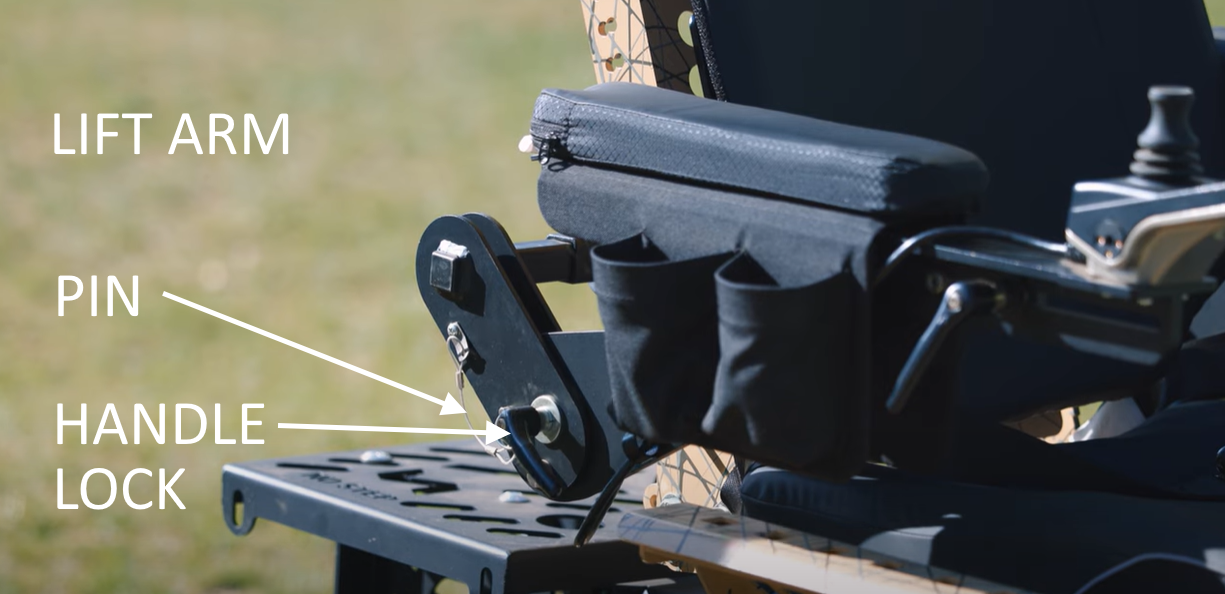
The armrests can move up to allow more room for transfers. To swing the armrests up, loosen the handle lock located at the back of the armrest by turning it counter clockwise. The AXIS 40 model at Windsor State Forest also has a pin to remove. After transferring, move the armrest down and secure by tightening the handle and reinserting the pin.
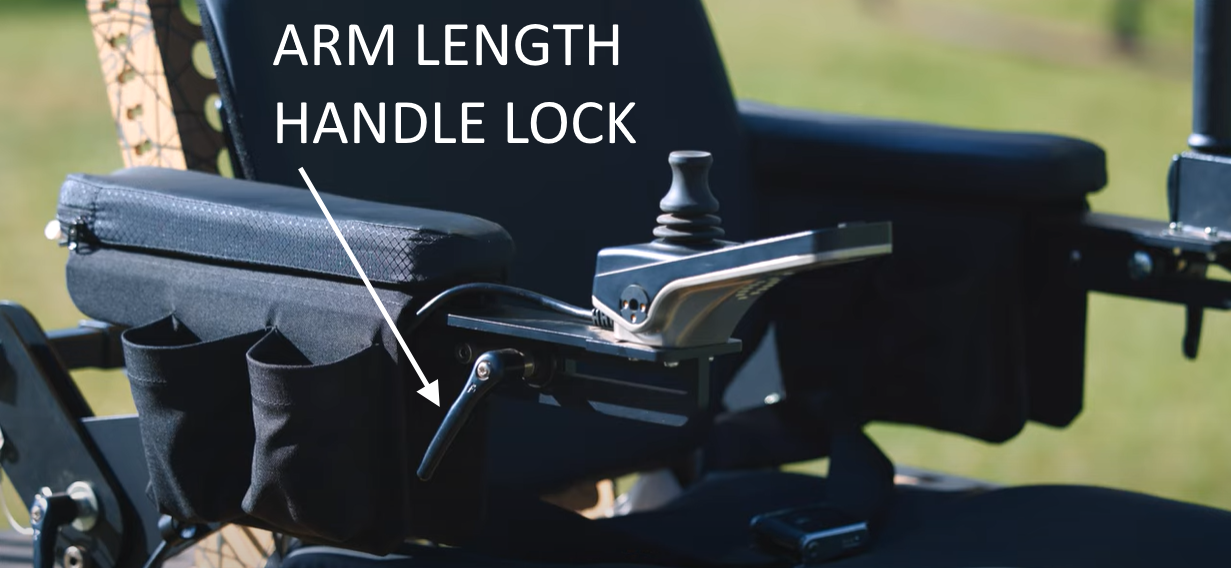
The length and width of the armrests can also be adjusted. Loosen the handle lock located on the front of the armrest and slide it to the desired length.
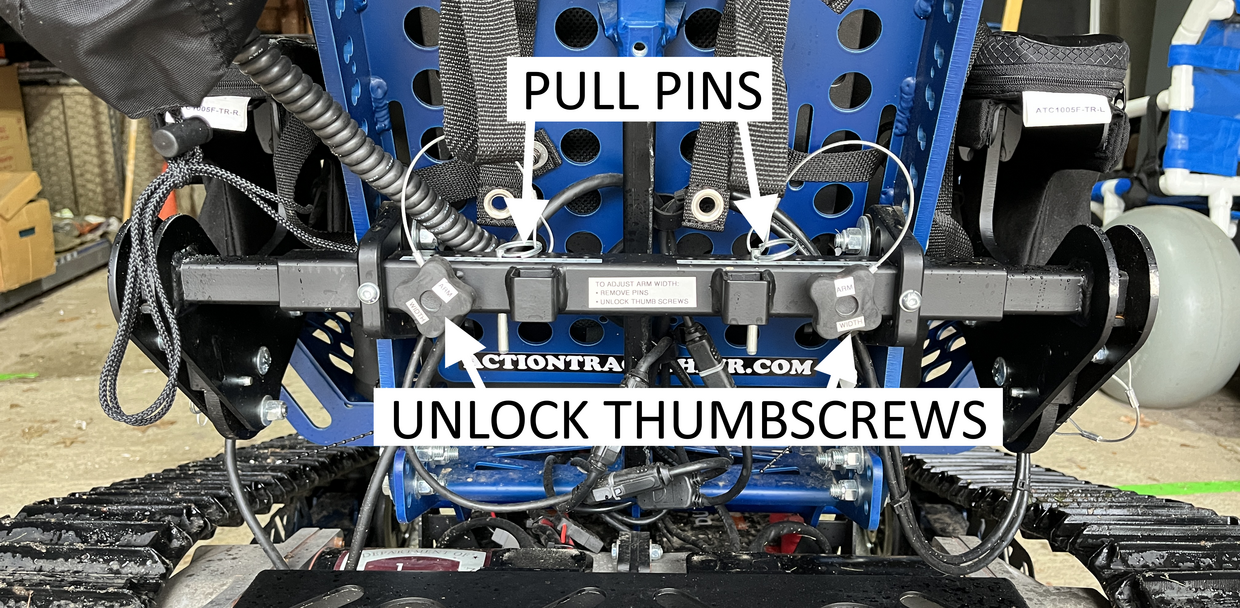
To adjust the width of the armrests, loosen the thumb screws with the black knobs and remove the pins located on the back of the chair. Lift up on the front of the armrest slightly to take the weight off and pull or push to move it to the position that is most comfortable for you. Line up the holes, put the pins back in, and tighten up the thumb screw. The numbers on the holes will help you remember the adjustment that is most comfortable for you on your next visit.
Headrest
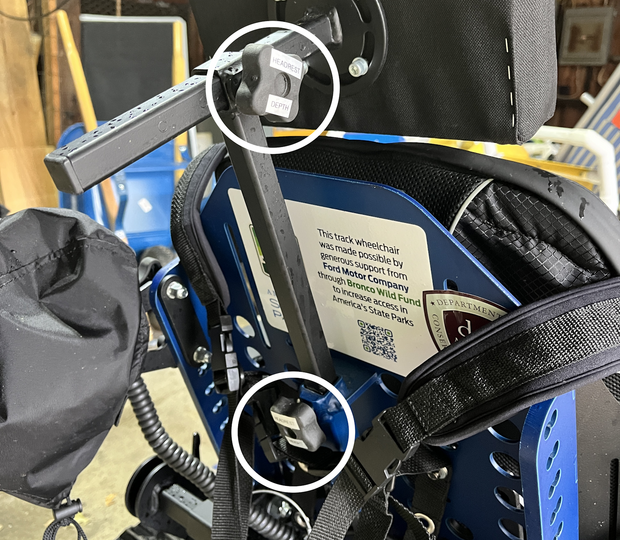
The headrest can be adjusted to provide head support if needed. To adjust the height of the headrest, loosen the thumbscrew on the back of the seat. To adjust the headrest back and forth, loosen the thumbscrew on the back of the headrest. After you have found a comfortable position, tighten the thumbscrews.
Footrest
The height of the footrest can be adjusted with pins on either side. The numbers on the holes will help you remember the adjustment that is most comfortable for you on your next visit. The Velcro strap on the footrest can be wrapped around your legs to keep them in place. At the lowest setting, the footrest will be just above the ground. Please be mindful of the footrest and tilt the Trackchair back far enough to get adequate clearance while riding on the trails.
AXIS 40
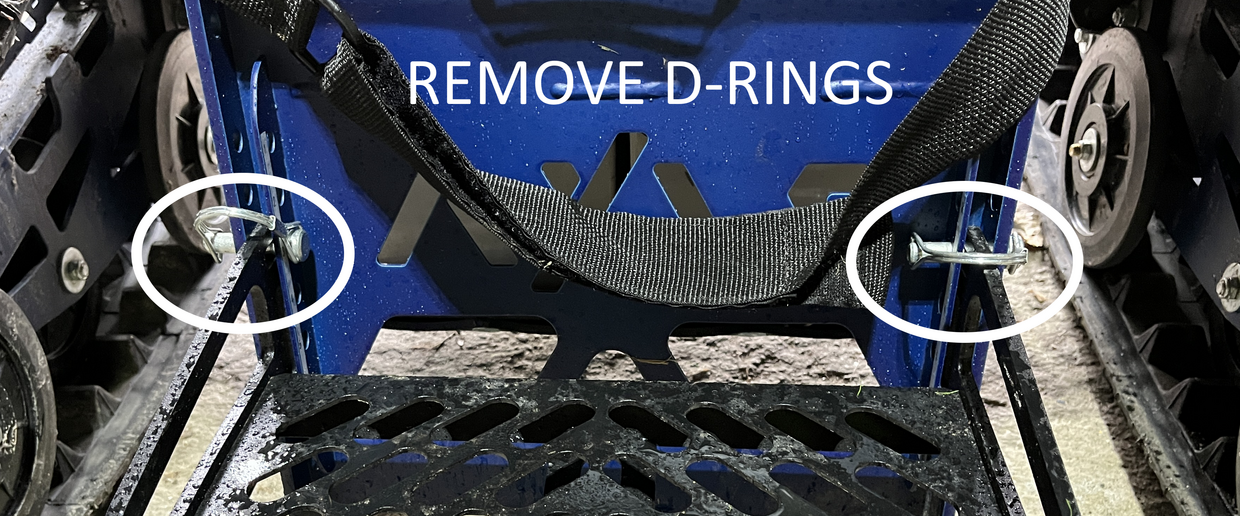
To adjust the footrest on the AXIS 40 model, unlock the D-rings on either side of the footrest and remove them. Slide the footrest to the desired height, lining up the top hole in the footrest with one of the numbered holes on the front of the Trackchair. Secure the footrest by re-inserting the D-rings and locking them.
NT 18
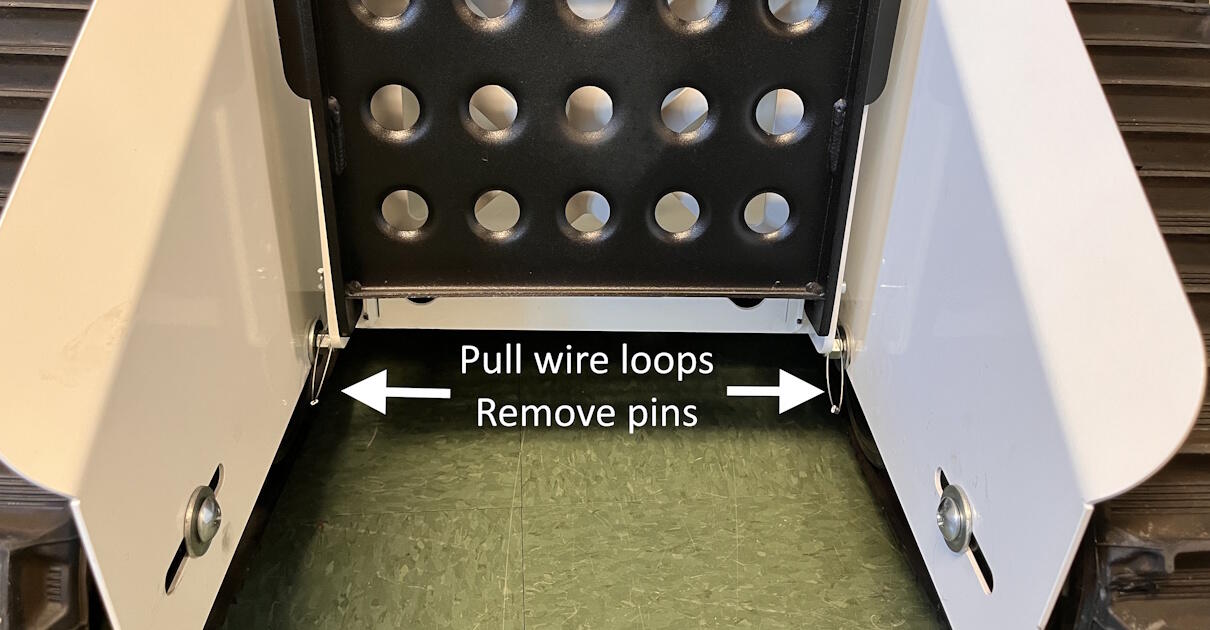
To adjust the footrest on the NT 18 model, pull on the wire loops on either side of the footrest to remove the R-clips from the round pins that hold the footrest in place. Then, remove the pins and slide the footrest to the desired height, lining up the hole in the footrest with one of the numbered holes on the front of the Trackchair. Secure the footrest by re-inserting the pins and into the numbered holes and locking them with the R clips.
Transfers
Power up the Trackchair by pressing the power button on the hand control module.
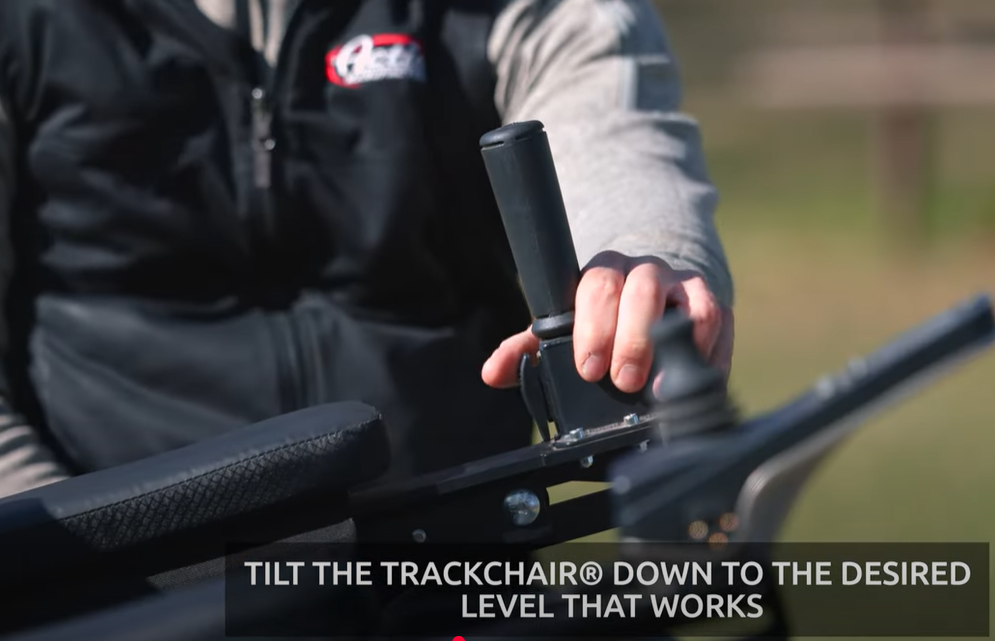
Use the seat tilt switch at the base of the hand support on the left-hand side to tilt the Trackchair down to the desired level that works best with the wheelchair you are transferring from. Once the Trackchair has been tilted down, power the Trackchair off to make sure the drive system is not accidentally engaged during the transfer process. Never get into or out of the Trackchair while it is powered on, regardless of your level of mobility.
You and your companion are responsible for transferring into the chair and adjusting it to fit your needs. Please note that DCR staff are not able to physically assist with transfers.
A transfer board is available if you need it. You can borrow straps, cushions, and foam wedges from the park to help get comfortable in the Trackchair, and a small adjustable umbrella to shade you from the sun. You are also welcome to bring personal comfort items you may need like blankets, cushions or pillows to sit on or to go behind your back, and additional straps for securing your feet, arms, or upper body.
Seatbelt and harness
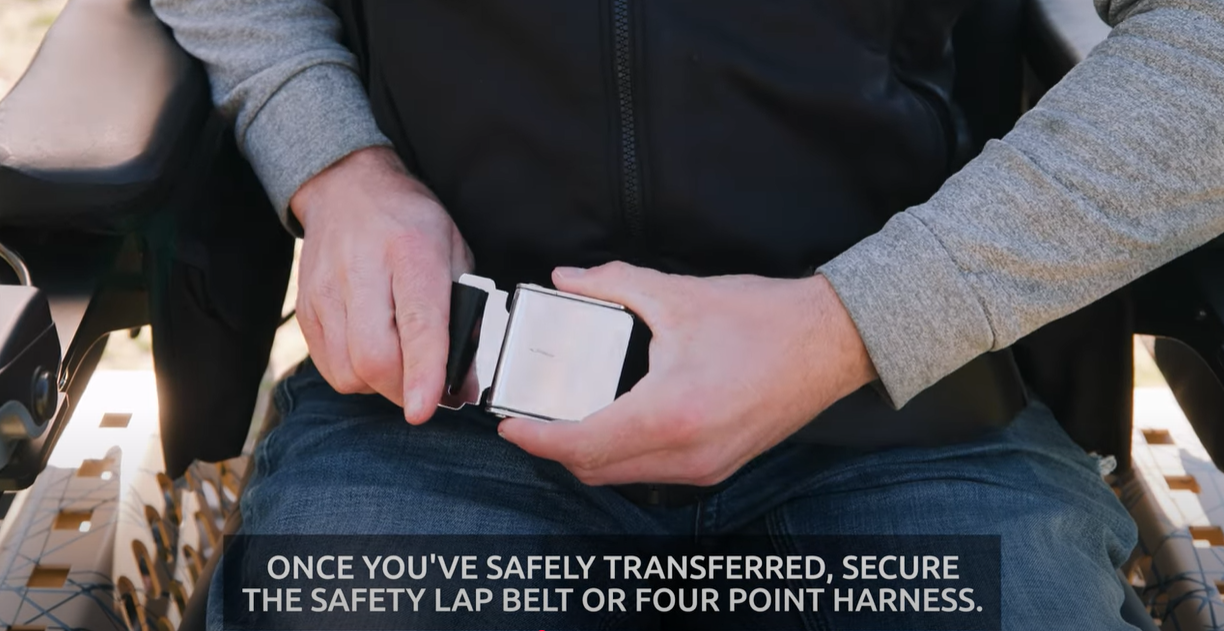
Once you have safely transferred, secure the safety lap belt. All users are required to wear their safety belt at all times. To fasten the lap belt, insert the tongue into the buckle. Then, tighten the belt on the buckle side until it is snug.
The four-point safety harness is removed when not in use. The harness is attached with 4 female buckles that connect to 4 male buckles found on straps on the Trackchair. Both halves of the buckles are labeled: top left, top right, bottom left, and bottom right. Once the harness is clipped to the chair, tnclasp the two buckles in the middle of the harness and slip your arms through the holes. You can adjust the fit of the harness at each shoulder, each hip, and next to each of the buckles in the middle.
Safety
The AXIS 40 at Windsor State Forest is rated to climb slopes up to 25° of incline (46% slope). The NT 18 at Maudslay State Park s rated to climb slopes up to 20° of incline (36% slope). Trackchairs will climb inclines enough to tip over in any direction. Always ride within your abilities and do not attempt to climb slopes you are uncertain about. When approaching inclines or declines always use caution and switch to a slower speed. Do not attempt to climb stairs, natural or otherwise.
Be aware of your surroundings at all times, especially when going in reverse. Always stay on the designated trails.
The weight limit of the AXIS is 300 pounds. The weight limit of the NT 18 is 250 pounds. This limit includes you and any gear you are carrying in the chair. The utility rack at the back of the Trackchair has bungee cords to hold your belongings. The utility rack can support up to 90 pounds.
Only one person is allowed on the chair at a time. You must not let people or animals sit in your lap, ride the chair with you, or pull on the chair when it is in motion.
Keep hands and fingers away from the rotating parts of the tracks and pinch points.
Leashes, long clothing, blankets, or other dangling items (e.g. backpack straps, camera straps) are at risk of becoming entangled in the tracks. Please be aware of dangling items and use caution. We recommend that your companion hold leashes whenever possible to keep them clear of the device.
Users aged 16 or younger must wear a safety helmet like a bike helmet while riding in the Trackchair, You will need to bring your own helmet.
Notify DCR staff immediately of any malfunctions, collisions, or other issues with the Trackchair.
Operation
Our Trackchairs have a fixed joystick mounted on the right-hand side, and an accessory control that can be mounted on the left-hand side for you to use, or on the back of the chair to allow your companion to control the chair.
Seat tilt switch
The seat tilt switch is located at the base of the hand support on the left side of the chair. This switch allows you to tilt on the fly while still operating the Trackchair.
Right-hand rider control
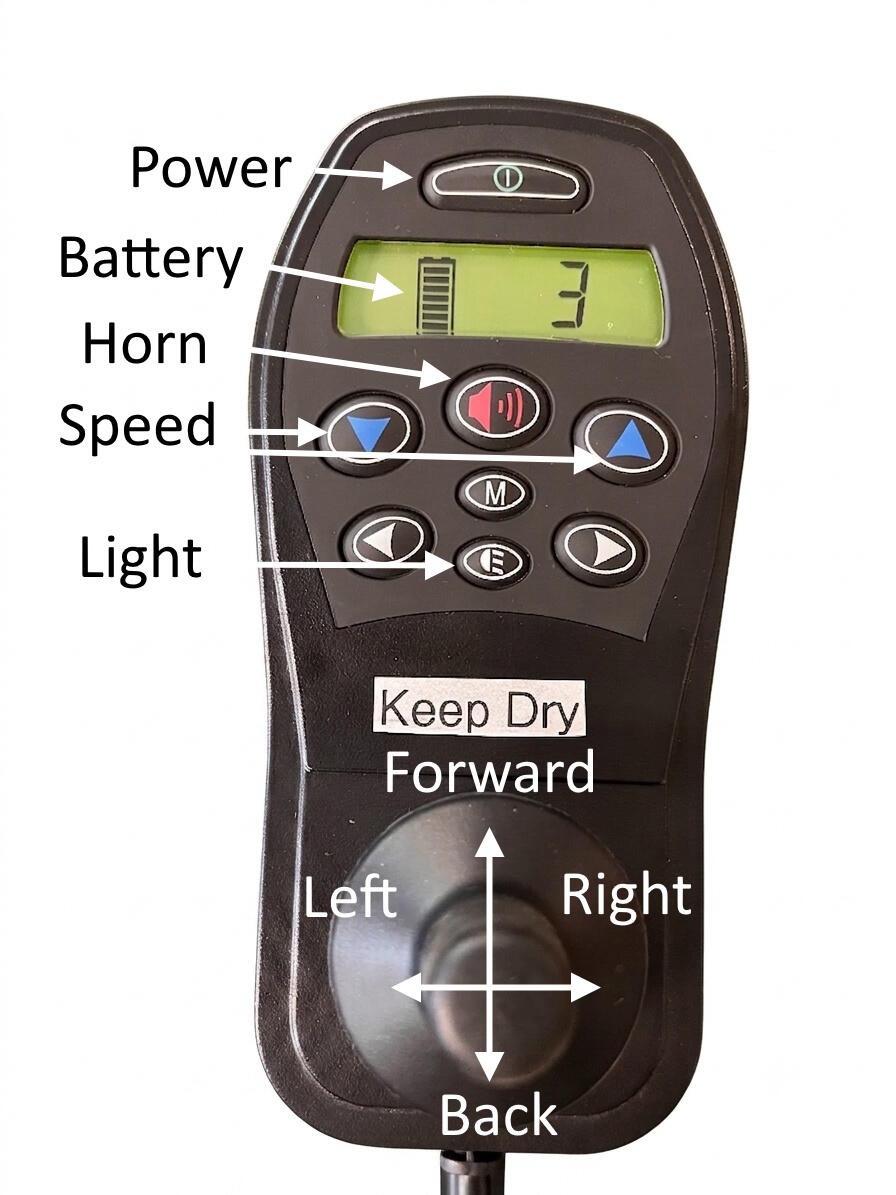
Power on the Trackchair by pressing the power button located at the top of the hand control. The Trackchair will boot up and display the action Trackchair logo. Tap the joystick forward to enter drive mode. Speed can be made by pressing the buttons beneath the screen: left to decrease speed, right to increase it. The AXIS 40 has 11 speed settings and the NT 18 has 5 speed settings.
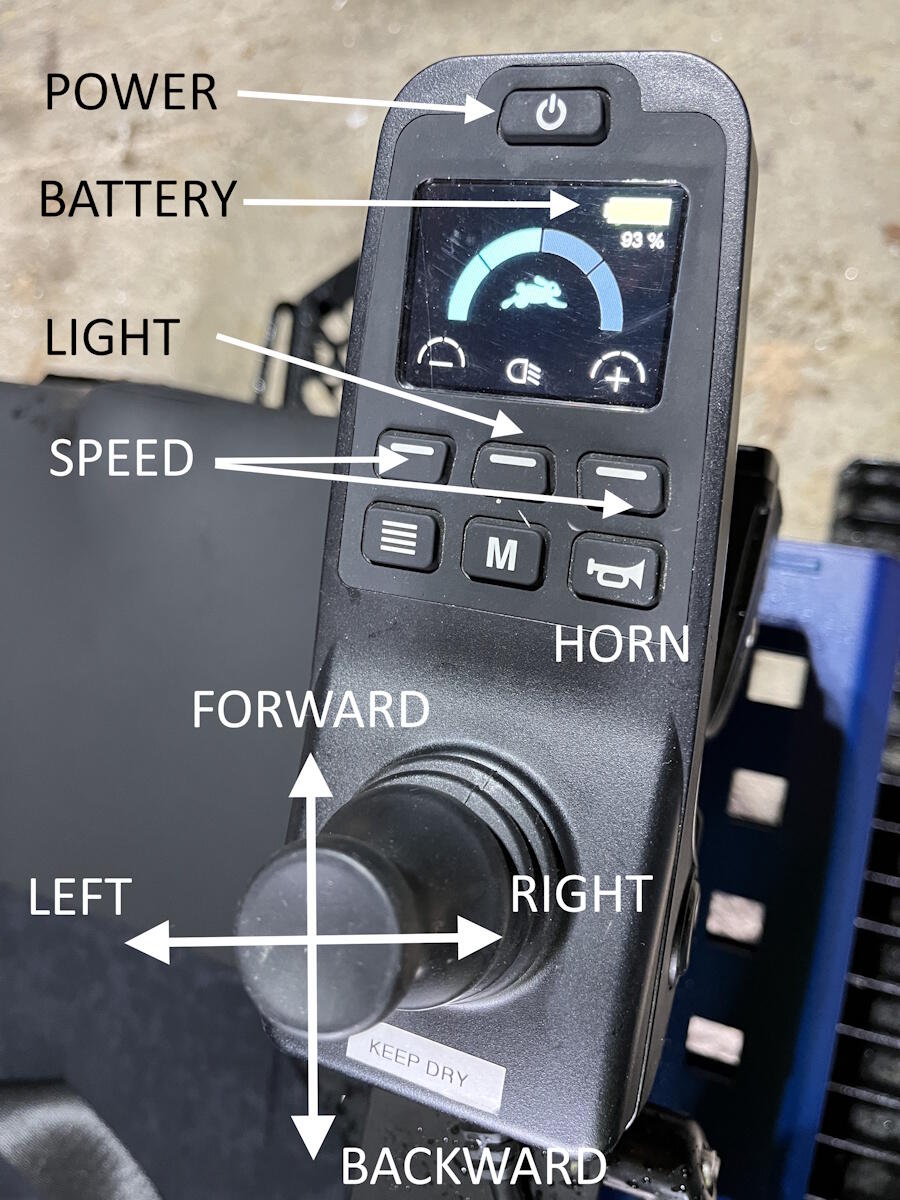
To drive forward, push the joystick forward. To drive backwards, push the joystick backward. To stop, let off the joystick. Please note that there are no brakes on the Trackchair: the motors will disengage when you let go of the joystick, but it takes a few moments for the Trackchair to come to a complete stop. The faster you are going, the further you will travel before you come to a complete stop.
To operate a zero-turn left-hand turn, push the joystick left at 90°. To operate a zero-turn right-hand turn, push the joystick right at 90°. To stop, let go of the joystick.
To activate the headlight, press the button with the headlight icon: the middle button located on the top row on the AXIS, and the middle button in the bottom row on the NT 18. To activate the horn, press the horn button. Battery life is indicated with a graphic.
Accessory control
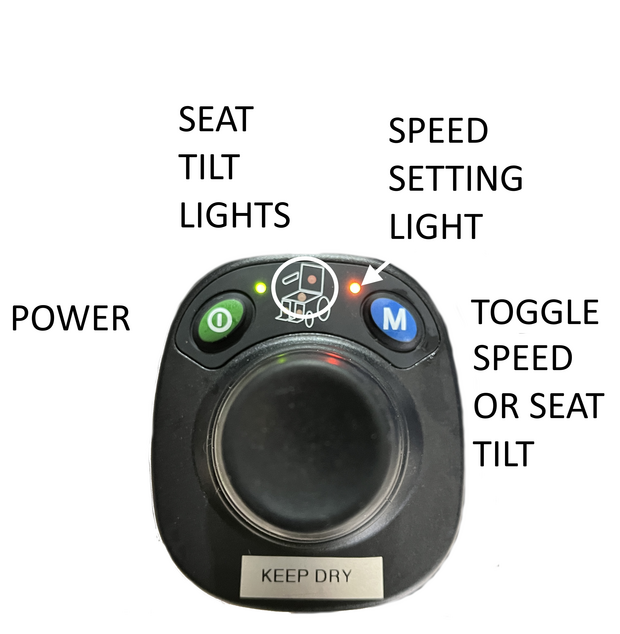
The accessory control can be mounted on the left-hand side for you to use, or on the back of the chair to allow your companion to control the chair. Once the accessory control is turned on, the hand control on the right will no longer work. Please leave the joystick cover over the joystick you are not using to keep it clean and dry.
Press the green power button on the left and wait a few seconds for the control to turn on. Tap the joystick forward to enter drive mode. You can toggle between two speed settings by pressing the M button. A green light indicates the higher speed setting, an orange light indicates the lower speed setting, and no light indicates the drive mode isn’t engaged. You can also tilt the chair using the attendant control on the AXIS by toggling the M button until green lights are displayed on the seat area. Move the joystick forward or backward to tilt the chair. To turn the chair off, press the green power button and wait ten seconds.
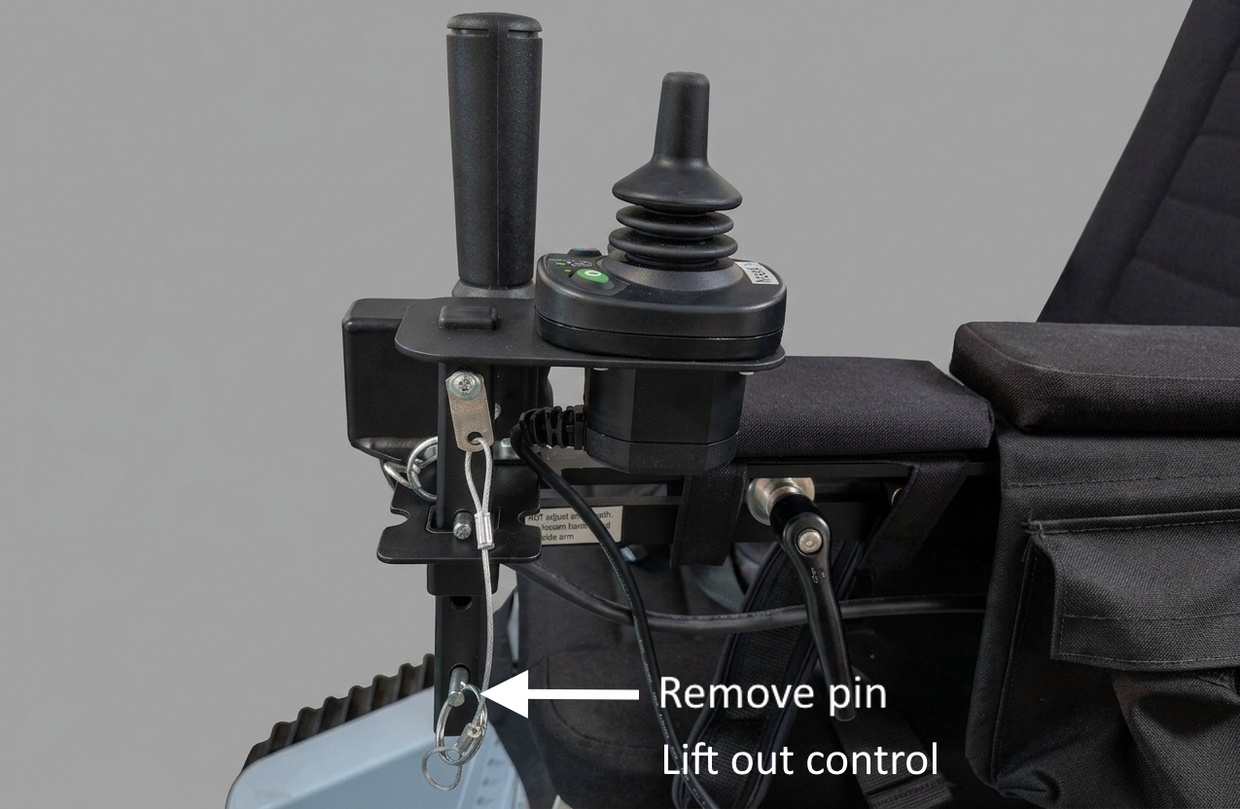
To move the accessory controller, slide the bottom pin found in the post underneath the controller and lift it out of the square receiver slot. You can place the post into one of the 3 receiver slots on the back of the chair for your companion to control the chair, or in the slot on the left-hand side to drive the chair with your left hand. After placing the post in the receiver, re-insert the pin to secure the controller. Please be mindful of the cable and keep it free of the tracks and pinch points.
Driving tips
When approaching an obstacle along your path, like a stump, log, or rock, direct your left or right track to directly encounter the obstacle to avoid high centering. Do not try to clear the obstacle. Remember to always put a track on it.
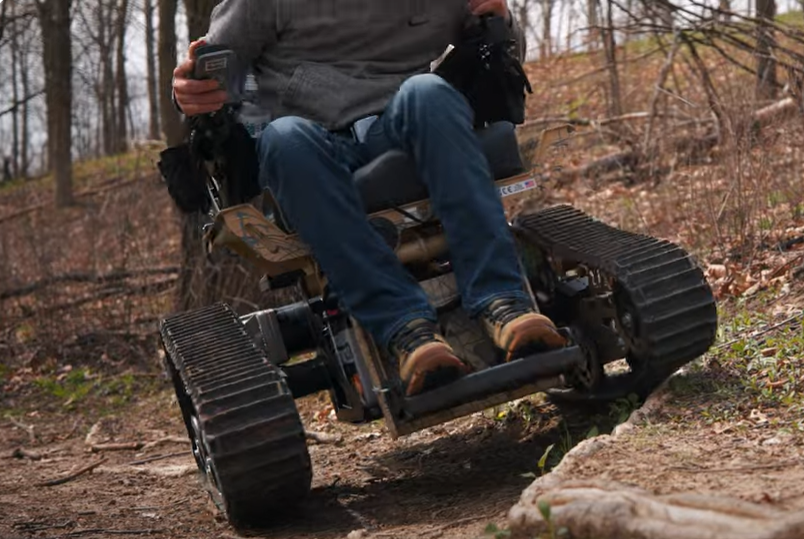
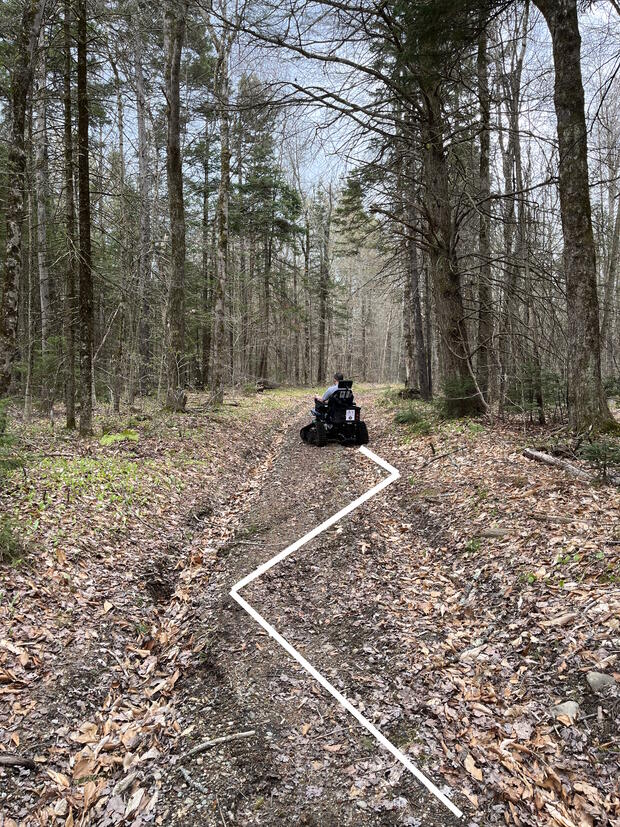
When approaching a steep incline, maneuver using a zigzag pattern. Tilt the seat backwards to allow for enough clearance at the base of the footrest. When ascending, tilt the Trackchair forward. When descending, tilt the Trackchair backwards. Making this tilt adjustment will move your center of gravity, resulting in a more comfortable ride.
Respect the surface or trail you are on by avoiding sudden turns and zero turns. Continuous zero turning will damage the ground and may cause a track to slip from the drive wheel.

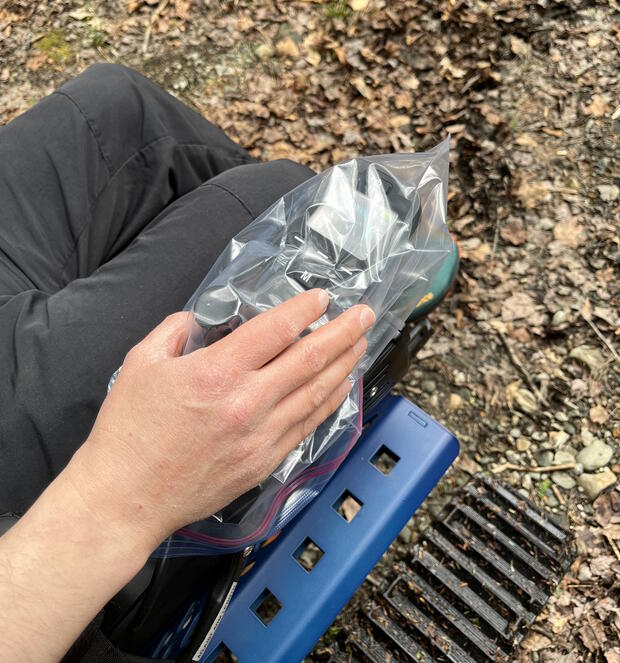
The Trackchair is rated to operate in up to 10 inches of water and can drive through puddles or be used at the water’s edge for fishing. Do not submerge the Trackchair in water. Do not get the joystick wet. Keep the joystick bag secured over whichever joystick is not being used. In the event of rain, immediately take out the plastic bag and cover the joystick you are using. You can steer through the plastic bag.
Other features
A larger cupholder that can accept bottles up to 3.5 inches in diameter can be installed on either side of the seat.
The arms include four small fabric cupholders for bottles up to 2 inches in diameter and two Velcro closure pockets for storage. Please check the pockets when you are done using the Trackchair to remove any belongings. DCR isn’t responsible for personal items left behind in the Trackchair.
You can use the dual USB charging port on the front of the chair to charge your devices during your ride.
Keeping the chair clean
Please do not smoke or vape while riding in the Trackchair. Please apply bug spray and spray sunblock before you get in the chair. If you need to re-apply while you are on the trail, please spray the product into your hand and rub it on instead of spraying.
Courtesy, ethics, and the environment
- Be courteous of other trail users.
- Share the trail. Give non-motorized trail users the right of way.
- Keep right unless passing.
- When passing others, alert them with an audible signal such as by voice, bell, or horn.
- Travel at a reasonable speed. The maximum speed allowed on power-driven mobility devices is 5 miles per hour.
- Yield the right of way to those passing you from behind or traveling uphill.
- Stay on designated trails. Riding off the trail damages wildlife habitat and contributes to erosion.
- Keep noise down.
- Do not litter. Carry in, carry out all trash and belongings.
Sharing trails with horses
Horses’ natural instincts can influence their behavior and affect the way they react to circumstances encountered on the trail. Meeting a Trackchair may be a new experience for a horse, and they may perceive it as a threat. Please follow these guidelines when meeting a horse on the trail.
- Speak to the rider and horse in a friendly, relaxed tone. Hearing you speak may help the horse understand that you are a person and not a threat.
- Pull to the side of the trail far enough for horses to pass safely as soon as you see them.
- Pull to the downhill/lower side of the trail if possible. Horses tend to see unknown threats on the uphill side as predators.
- When approaching horses from behind, stop. Call ahead and make yourself known to the rider. Ask them if it is OK to pass and the best way to do so.
- Riders might pull to the side of the trail if they hear you coming, but this doesn’t mean it is safe for you to ride by. Stop and wait for instructions from the horse rider.
- Ask the horse rider what they would like to do. The horse rider will know their horse and how they react.
- The horse rider may ask you to stop so they can ride past you.
- The horse rider may stay to the side of the trail and ask you to pass them.
- If you pass a horse, keep your speed low and steady and your sound as low as possible. Sudden movements or sounds can startle horses.
- Be alert, aware, and on guard for oncoming hikers or horses while you are passing.
Reservations
Thank you for reviewing these instructions. You can now make a reservation for the NT 18 at Maudslay State Park or make a reservation for the AXIS 40 at Windsor State Forest. The reservation code is 112358.
The Trackchair is available at Maudslay State Park from May 10–October 31, 2026 (with a pause in June for scheduled maintenance), and at Windsor State Forest from June 19–October 12, 2026.
Thank you to our partners


DCR’s Trackchairs were made possible by generous support from The Play Brigade and Ford Motor Company through Bronco Wild Fund.
Questions and feedback
If you have any questions, concerns, or feedback about the Trackchair, or are having trouble making a reservation using the online form, please contact the Universal Access Program at DCR.UniversalAccess@mass.gov or (413) 461-7126.