
Who is eligible for an E-Title transfer?
All of the requirements below must be met.
Buyer and seller
• Both the buyer and the seller must be Massachusetts residents with active myRMV accounts to access the myRMV Online Service Center.
• Both must be individuals, not businesses.
• A vehicle can have more than one seller, such as joint owners, but only one buyer.
Vehicle
• The vehicle must already have an E-Title. If you have a paper title, convert it to an E-Title before starting. Learn more on how to convert your title format.
• The title must have no brands, such as odometer, salvage, or junk. It should be a clear title.
• The vehicle must have no active lien.
• Eligible vehicles include automobiles under 10,000 lbs., buses, trucks, motorcycles, recreational vehicles, motor homes, and tractors.
• Trailers, semi-trailers, mobile homes, special machinery, mopeds, golf carts, all-terrain vehicles, and boats are not eligible.
Sale
• The sale must be a private sale between individuals.
• Gifts, $0 sales, leases, and court-ordered transfers are not eligible.
• Each person must act for themselves. Power of attorney can't be used.
Before you start
- The buyer and the seller must be Massachusetts residents with active MyMassGov accounts to access the myRMV Online Service Center.
- Confirm you meet eligibility criteria. Review the eligibility criteria and make sure buyer and seller qualify.
- Agree on the sale terms. Settle the price, payment method, delivery, and the vehicle's condition. These are arranged between the buyer and the seller, outside of myRMV.
- Plan how you'll stay in touch. The seller will give the buyer a transfer code, and the buyer must use it in myRMV within 24 hours to see the vehicle and the offer. Decide how you'll share the code and contact each other so the code doesn't expire.
- If there's more than one seller, every seller must agree to the sale terms ahead of time. All sellers must approve the sale start in myRMV within 48 hours after the first seller starts it. The whole transfer, from the first seller starting the sale to all sellers releasing the vehicle, must be completed within 5 days.
How the E-Title transfer works
The following outlines the actions taken by the seller and buyer during an E-Title Transfer Sale for person to person private sales.
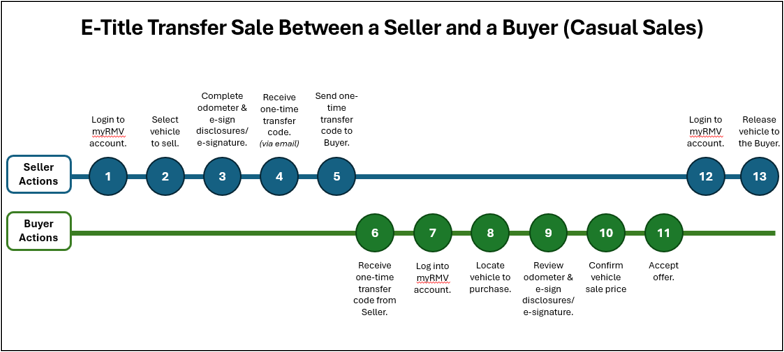
Keep in mind:
- Sellers: Get paid before you release the vehicle. After you release it, ownership transfers to the buyer.
- Sellers: Remove your plates, then cancel or transfer your registration.
- Buyers: You're responsible for titling and registering the vehicle. Instructions are below.
- If there are two or more owners, each owner is a seller. Each must log in to their own myRMV account to approve starting the sale and to release the vehicle.
Title and register your vehicle after an E-Title transfer
Save time: start your title online. If there will be no lien on the vehicle, you can apply for your title online within 10 days of purchase and pay the title fee and sales tax there. You'll still need to register in person.
- Complete the RTA Form. Fill out a Registration and Title Application (RTA Form) and select:
- Register previously titled vehicle if you already applied for your title online, or
- Register and title a vehicle if you did not.
- Get your insurance stamp. Have your insurance agent stamp and sign the RTA Form.
- Visit an RMV Service Center. Schedule an appointment and bring your RTA Form, your E-Title transfer confirmation from myRMV, and any supporting documents to an RMV Service Center. Walk-ins are welcome, but customers with appointments are served first.
- Pay your fees. You'll pay the registration fee at the Service Center. If you didn't title online, you'll also pay the title fee and sales tax there.
Your E-Title should be available within 15 days.
For more details, see Apply for a registration and title for a vehicle purchased from an individual.
Fees
You are responsible for registration fee, title fee, and 6.25% sales tax. Registration fees vary by plate type. You will pay the title fee and the sales tax when you title the vehicle online after the E-Title transfer.