
PFML exemption requests are now managed in the PFML Employer Portal
On July 1, 2026, the Department of Family and Medical Leave (DFML) introduced a new process for requesting and renewing private plan exemptions for Paid Family and Medical Leave (PFML). Employers now use the PFML Employer Portal to request PFML exemptions and renewals for purchased or self-insured private plans. PFML exemptions are no longer filed via MassTaxConnect.
Standards for fully insured paid leave plans
Massachusetts employers that offer approved private plans with paid leave benefits that are equal to or more generous than those provided under the Paid Family and Medical Leave (PFML) program may be eligible to request an exemption from making family or medical leave contributions. Exemptions are only available to employers. Individuals cannot apply for an exemption from contributions deducted from their wages by their employer.
There are two types of plans that can qualify for exemptions:
- A self-insured private plan funded by an employer (which may be administered by a third-party administrator)
- A purchased private plan offered by an insurance carrier licensed by the Division of Insurance (DOI)
Additional Resources
What you need to know before applying for a PFML private plan exemption
If you are an employer and want to apply for an exemption from making contributions for family leave, medical leave, or both, you must submit an application through the PFML Employer Portal. Please note:
- Exemption requests must be approved in the quarter prior to the quarter in which they go into effect.
- Employer exemptions must be renewed annually.
- To be granted an exemption, the benefits you provide must be greater than or equal to those provided under M.G.L c. 175M (the paid leave law). This means your approved plan must meet all the minimum requirements and must not cost your covered individuals any more than they would be required to contribute to the state plan under the paid leave law. Even if your exemption is approved, you must continue to comply with an employer's duty under M.G.L. c. 175M, sec. 4 to display workplace posters about the PFML law and provide your workforce with written notice of PFML benefits, contribution rates, and other provisions.
- Employers seeking Paid Family and Medical Leave (PFML) exemptions must submit separate applications for each entity that has its own federal Employer Identification Number (FEIN) and a Massachusetts workforce.
- Certain employers are automatically excluded and do not need to apply for an exemption. If you have questions about your organization’s contribution status, please contact the Department of Revenue at (617) 466-3950.
- If you are granted an exemption, your covered individuals will still be entitled to the rights and protections provided under MGL c. 175M. This includes:
- The right to appeal a decision about their application for benefits
- The right to job protection during any leave taken
- Protections against retaliation from taking leave or exercising other rights under paid leave law
Step-by-step guide to applying for a PFML exemption
Step 1: Visit the PFML employer portal
Create an account or log in to your existing employer account.
Step 2: Find your organization
From the Welcome page, go to the “Organizations” tab. If you are new to the PFML employer portal, you may need to use your MassTaxConnect PFML account ID to verify your organization. You can fill out this form for assistance if you have trouble verifying your organization within the PFML employer portal.
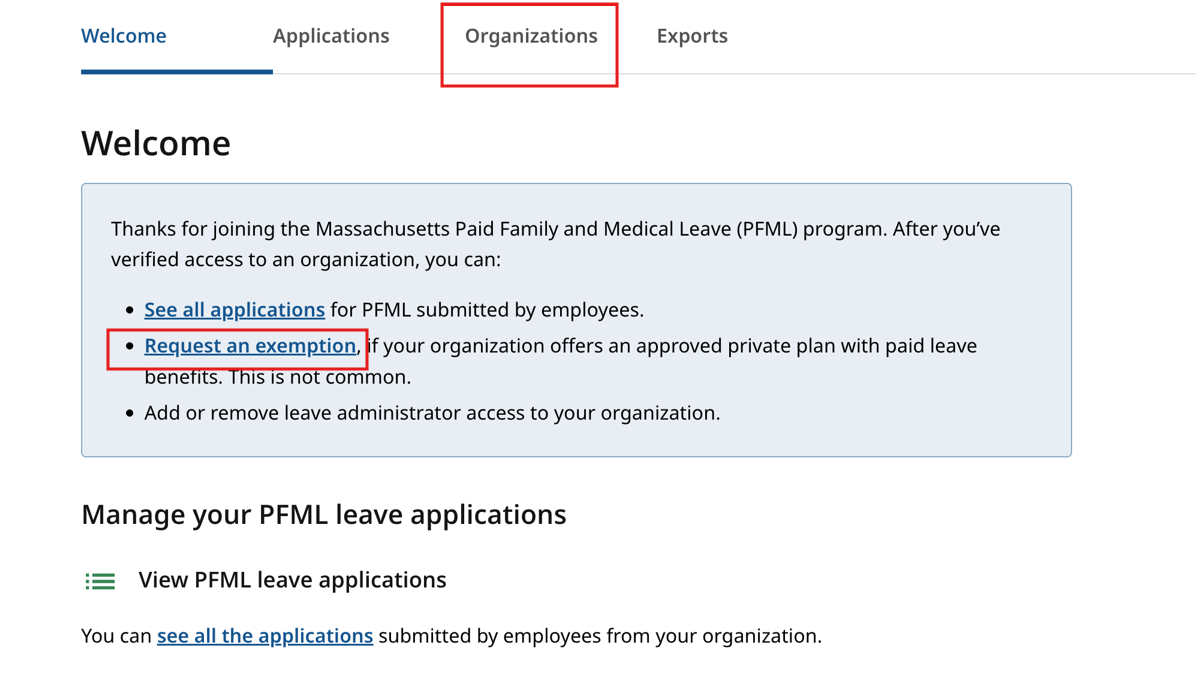
Step 3: Manage exemptions
Navigate to the “Exemptions” tab. If the EIN associated with your organization has a history of PFML exemptions, this tab will show past approved exemptions, including coverage type and effective dates.
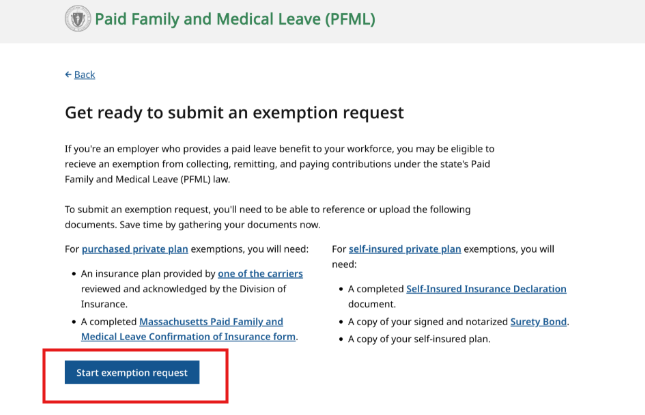
Step 4: Start a request for a new exemption
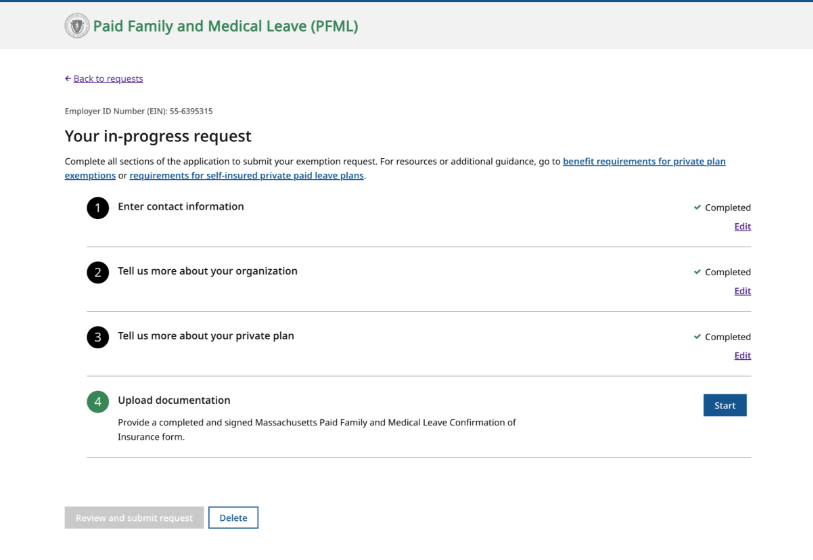
In the “Exemptions” screen, select the “start new request” button. You will be taken to an acknowledgment page. Then you can begin your request. You may be asked for the following information:
- Contact Information: your name, title, phone number, and email. Also, the contact info for your third-party administrator, if applicable.
- Organization information: including workforce size. Plan information: coverage type and effective dates.
- Supporting documents: upload proof of paid leave benefits plus:
- A completed Confirmation of Insurance (COI) form for fully insured plans, or
- A Surety Bond form and Self-Insured Insurance Declaration for self-insured plans.
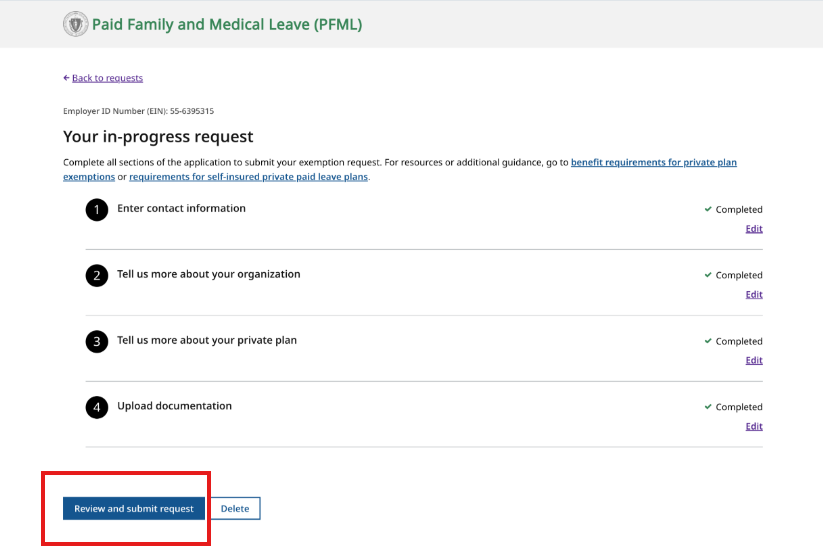
Step 5: Review and Submit
After submission you will receive an email with updates on your request.
You can also watch a walk-through video of the exemption request process.
PFML exemption request FAQ
What if I manage exemptions for multiple organizations?
You can add multiple EINs to one account. All EINs that are verified for your account will be shown in your organizations tab. Employers must submit separate applications for each entity that has its own federal Employer Identification Number (FEIN) and a Massachusetts workforce.
Can multiple staff members access the portal?
Yes, multiple people can access the same organization in the portal but each individual should have their own log-in. To add members, click on the business name and find the “add leave administrator” link.
Can insurance carriers submit exemptions?
No, only employers can submit exemption requests.
Who do I contact if I need assistance with an exemption that was filed prior to July 1, 2026?
If you require assistance with an exemption request or renewal filed prior to July 1, 2026, please contact the Department of Revenue at (617) 466-3950.
Contact
Phone
Department of Family and Medical Leave - Hours of operation: Monday-Friday, 8 a.m. - 4:30 p.m.
Department of Family and Medical Leave - Hours of operation: Monday-Friday, 8 a.m. - 4:30 p.m.
Department of Revenue - Hours of operation: Monday-Friday, 8:30 a.m. - 4:30 p.m.
| Last updated: | July 1, 2026 |
|---|