
On the 33rd anniversary of the Americans with Disabilities Act (ADA), Governor Healey signed Executive Order 614, ensuring all persons have equitable access to government services and information. The order established the Digital Accessibility and Equity Governance Board (DAEGB), which guides the Secretary and the Chief IT Accessibility Officer (CIAO) of the Executive Office of Technology Services and Security (EOTSS) on digital equity, including standards, policies, procurement, and federal funding opportunities.
The ADA requires all state and local government entities to provide equal access and opportunity for individuals with disabilities in their programs, services, and activities, ensuring they are not excluded or discriminated against. This includes the way physical spaces have wheelchair ramps and Braille on signs, and it requires digital accessibility, ensuring that the online world offers equal access to everyone. In the latter, it is about designing and developing publications, social media, websites and applications so everyone, including people with visual, auditory, motor, or cognitive disabilities, can perceive, understand, navigate, and interact with digital content independently.
People with disabilities often use assistive technologies, which may be a piece of equipment, software program, or system that increases, maintains, or improves functional capabilities. Different assistive technologies support different disabilities. Below is a table of some types of assistive technologies.
| Assistive Technologies | Examples |
|---|---|
| Hardware | Prosthetics, mounting systems, and positioning devices |
| Computer Hardware | Special switches, adaptive keyboards/mice, touchpads, eye-trackers, refreshable Braille displays, pointing devices, and adaptive accessories, eye-gaze and head trackers, sip and puff devices |
| Computer Software | Screen readers, magnifiers, high contrast settings, text readers, dictation and voice commands, speech-to-text, on-screen keyboards, and communication programs |
| Inclusive or Specialized Products | Learning materials, curriculum aids or specialized curricular software |
| Other Devices | Wheelchairs, walkers, braces, power lifts, pencil holders, head pointers |
To help make sure that digital content works with the assistive technologies, the World Wide Web Consortium (W3C) established the Web Content Accessibility Guidelines (WCAG). WCAG is the internationally recognized technical standards developed to make digital content accessible for people with disabilities, ensuring it's perceivable, operable, understandable, and robust. There are three compliance levels, starting at A, the minimum level with the easiest criteria, up to AAA, the highest level with the broadest accessibility.
| Level | Description |
|---|---|
| A | The minimum level requirements any website should be able to meet. Requirements include:
Providing clear information or instructions in additional ways to using just shape, size, or color |
| AA | The mid-range conformance level represents strong accessibility. It satisfies all Level A and Level AA criteria. Requirements include:
Navigation elements must be consistent throughout every webpage |
| AAA | The highest level of conformance, providing exceptional accessibility, but unachievable for certain content. It satisfies A, AA, and 28 additional criteria. Requirements include:
|
In 2024, U.S. Department of Justice issued a final rule updating ADA Title II. It stipulates that websites must comply with WCAG 2.1 Levels A and AA as the technical standard for digital content and digital services used, shared, created, and procured by state and local government. For the Commonwealth and 27 communities with a population of 50,000 or greater, they must adhere to the standard by April 24, 2026, and those with a lower population have until April 2027. The population is calculated by the United States Census Bureau in the most recent decennial Census. For municipalities, the deadline applies to the primary website as well as any local school and other departments’ independent websites. For regional school districts, the population estimate is calculated by the Census Bureau in the most recent Small Area Income and Poverty Estimates (SAIPE). For a special district government entity, which is authorized by state law to provide one or a limited number of designated functions with administrative and fiscal autonomy and whose population is not calculated by the Census Bureau, compliance is by April 2027.
At about this time, Ashley Bloom was hired as the first CIAO and EOTSS began establishing the Accessibility Center for Consulting, Education and Support Services (ACCESS) team. ACCESS oversees digital accessibility for state agencies, guides and supports the delivery of accessible digital experiences, and provides standardized processes, trainings, and resources. It works with organizations at the state and local levels to make sure their digital services and information are accessible to everybody.
Because it is essential that each community be aware of and make efforts to meet compliance, ACCESS has the Accessibility Awareness for Municipalities and Schools webpage. It provides guidance and strategies for communities regarding inventorying digital content and archiving older web content. Resources include:
- Self-paced materials
- Instructor-led trainings
- Training and consultation through regular Office Hours
- Automated tools to install (e.g., ANDI, WAVE and Axe)
- Document accessibility checklists and decision tree
- Developer testing tools
In addition, the ACCESS website has a section on the procurement of accessible digital products and services. It includes information on planning for accessibility during procurement, vendor questionnaire, conformance report checklist, contract language and testing obligations. It also has the statewide IT accessibility service contract, ITS82. ITS82 can be used by eligible entities to get expert assistance in creating or remediating online systems and services, documents, multimedia, and communications. ACCESS does not police digital accessibility compliance but rather is available to provide support in making this happen.
Over the last few years, communities have upgraded and relaunched their websites or are working towards making them ADA compliant. They conduct remediation in-house, with the assistance of consulting services, or a combination of the two. It is not one person or one department that takes this project on, but rather a team effort. All staff and officials need awareness and training, and each department should evaluate its existing web content to determine what should be archived or needs to up revised. In addition, the ADA coordinator or commission should be actively involved, legal counsel may need to be consulted on archiving and potential exemptions, and progress should be monitored and regularly reported. Equally important, standards need to be set, and all postings reviewed to avoid the extra work needed to be remediate after the fact. Developing an ADA compliant website is not a one-time project. It’s an ongoing responsibility that may require recurring resources for periodic review and corrections as needed.
Microsoft Office products have an Accessibility Assistant, which is a tool that reviews the content, so it is easier to read, edit and share. It is found under the Review tab. Once started, the Accessibility Assistant automatically runs in the background, detecting accessibility issues and inserting the accessibility icon in the document and displaying notices in the status bar. If there is an issue, an investigate warning appears. Selecting the accessibility status text activates the Accessibility Assistant that provides suggestions and guidance to help resolve flagged items that are grouped into five categories:
- Color and Contrast—help make text readable
- Media and Illustrations—flag missing alt text that describe charts, forms and infographics
- Tables—check structure and layout
- Documents and Structure—look at headings and formatting
- Document Access—makes sure readers can navigate the content and access is not restricted
When identified accessibility issues are resolved, the visual warning changes to indicate that no issues are found. The accessibility status text then reads, "Accessibility: Good to go." Generally, when content is properly created in Microsoft Word and follows accessibility best practices, the exported PDF will be accessible with minimal intervention. The ACCESS Team does not recommend converting PowerPoint slides or Excel workbooks to PDF.
Common inaccessible content on websites is scanned documents. These are not accessible because computers typically treat them as images, not selectable text. Using the Adobe Acrobat Pro feature Scan & OCR turns content into searchable, editable text. As an image, it prevents screen readers and text-to-speech tools from working properly. Consequently, the user would have to download and save the file, and then open it in Word, which would convert the PDF to a readable document, but inaccuracies will likely be present.
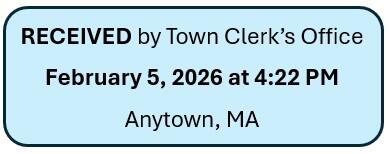
Typical scanned documents include wet signature and time-stamped documents. To address these, communities have digitized the necessary signature for insertion to a Word document before converting to a PDF for posting. Similarly, a clerk’s time stamp image may be inserted electronically in the document before converting it to a PDF, or the clerk posts a readable document to the online agenda center, listing the meeting date with the official posted date and time.
For those communities that report they have ADA compliant websites, congratulations and continue auditing your site and taking action as necessary. For all others, the Division of Local Services encourages you to speak with your webmaster or web service provider to help evaluate your site and make sure that the community’s leadership and all departments are working collaboratively towards compliance. To achieve this common goal, cities and town should take advantage of the guides, training and support ACCESS has available.
Helpful Resources
City & Town is brought to you by:
Editor: Dan Bertrand
Editorial Board: Tracy Callahan, Sean Cronin, Janie Dretler, Jessica Ferry, Christopher Ketchen, Paula King, Jen McAllister, Brianna Ortiz and Tony Rassias
| Date published: | February 19, 2026 |
|---|